


Time Clock: Easy Tracker
4.76.09K Reviews
App Specs
- Version
- 3.4.1746
- Updated On
- License
- Free
- Downloads
- 1,000,000+
- Developer
- Time Squared (TSQ Publishing Corp.)
- Categories
- Business
- Platform
- Android, iOS
Screenshots
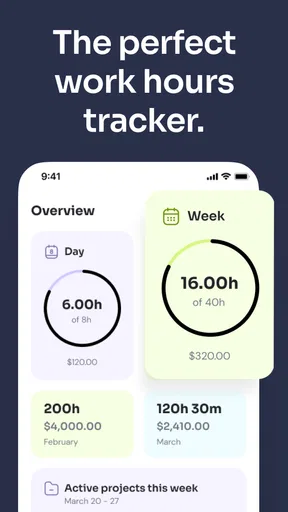
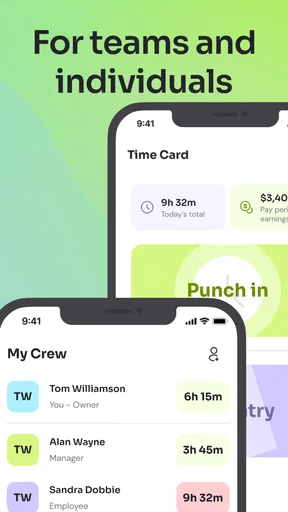
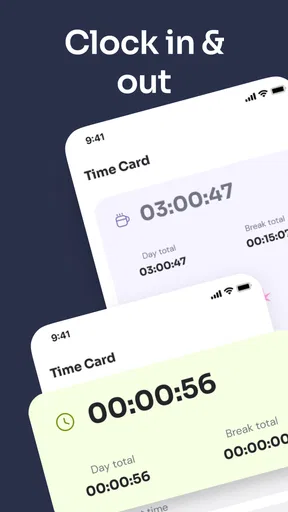
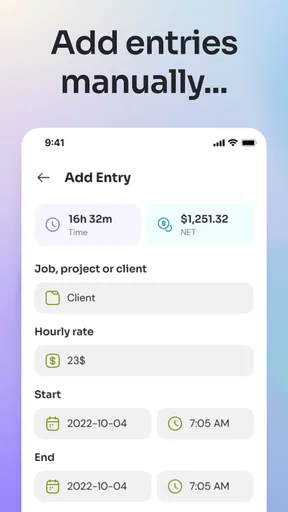
 Analysis by AppCompare
Ever found yourself wondering where all the time goes? Well, I’ve been on a quest to figure that out, and I stumbled across an app called Time Clock: Easy Tracker. It's like having a pocket-sized personal assistant keeping tabs on all your tasks, and I’ve been giving it a whirl to see if it lives up to the hype.
For me, the central idea is simple: keep a record of work hours without turning timekeeping into another job. The app is a free business tool from Time Squared (TSQ Publishing Corp.), and that focus makes it more useful to think of it as a practical time clock than as a broad productivity coach. Its listing shows a 4.7 average from around 24,000 ratings, and more than a million installs. Those figures suggest it has found an audience, but the real question is whether a straightforward work log suits the way you work.
The useful distinction is between starting a timer and entering a time card. A live timer can help when you move between tasks and remember to start and stop it; adding hours afterward can be easier when your workday is irregular or you prefer to record a shift at the end. That flexibility matters because people often abandon trackers that insist on one rigid routine. I would choose one method as the default and stick with it for a week, rather than switching back and forth and making the record harder to interpret.
Getting Started with Time Clock: Easy Tracker
First things first, let’s talk about setting it up. Downloading Time Clock: Easy Tracker is a breeze. It’s available on both Android and iOS, so you’re covered no matter what device you’re using. Once you’ve got it on your phone, you’re greeted with a clean and intuitive interface. No clutter, no fuss—just straightforward design that makes it easy to dive right in.
Setting up your profile and starting to track time is as simple as pie. The app prompts you to input your tasks, and you can categorize them effortlessly. Whether it’s work, hobbies, or just daily errands, the app lets you tailor it to your needs. What I love is how customizable it is—it’s like having a planner that adapts to your life.
A small setup decision can have a lasting effect: name tasks in a way that will still make sense when you review a week of entries. “Client call” is more useful later than “work,” while overly fine-grained labels can make every start and stop feel like paperwork. I’d begin with only the handful of task or project names I genuinely need, then add more once a recurring gap becomes obvious. A time log is only as helpful as the habits it supports.
Features That Stand Out
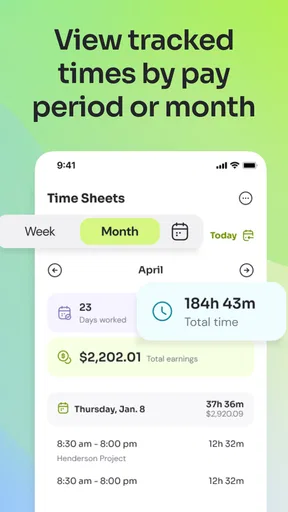
One of the standout features has to be the detailed reports. At the tap of a button, you can see where your minutes are slipping away. It’s like holding a mirror up to your day, showing you exactly what’s eating up your time. I was surprised to learn how much time I spend on social media—yikes!
Worth Reading Before You Choose

EA SPORTS FC Mobile 26 Is a Bigger Football Game, but It Takes Time

Flipboard Shows What News Apps Must Do Beyond the Feed

Switching to Android Auto Means Rethinking Your Driving Routine

Google Calendar Makes a Crowded Week Easier to Manage

Ludo King Makes the Most of the Minutes Between Plans

Baby Panda World Brings Quick Play to Modern Phones, but Its Game Library Feels Busy
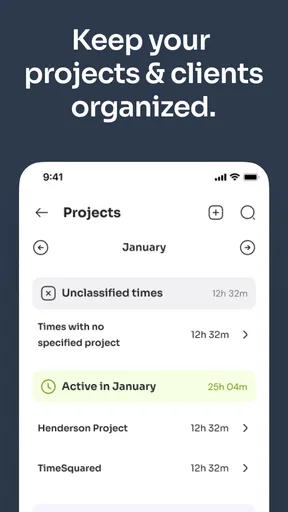
The app also supports a nifty feature called project tracking. This is a game-changer if you’re juggling multiple projects. You can assign different tasks to specific projects and track how much time each one is consuming. It’s perfect for freelancers or anyone managing various responsibilities.
Reports become more valuable when you decide in advance what you want them to answer. For example, a freelancer might ask whether a particular client’s revisions are taking longer than expected, while a shop owner could look for the balance between customer-facing work and administration. I’d review entries at a consistent point—perhaps when closing the day—so forgotten blocks are corrected while they are still fresh. The point is not to audit every minute; it is to spot patterns that can guide a practical change.
Project tracking also helps separate work that otherwise gets blended together. If two clients both require calls, preparation, and follow-up, recording those activities under the right project makes the eventual comparison more meaningful. There is a trade-off: more detailed categories produce a richer record but demand more attention while logging. For a short job, one broad project label may be enough; for ongoing client work, a little extra structure can make later review and billing much clearer.
The User Experience
Using Time Clock: Easy Tracker is smooth sailing. The developers have kept things simple and user-friendly, which is a breath of fresh air. The timers are easy to set up and manage, and you can pause and resume with a quick tap. If you’re like me and often get interrupted, this feature is a lifesaver.
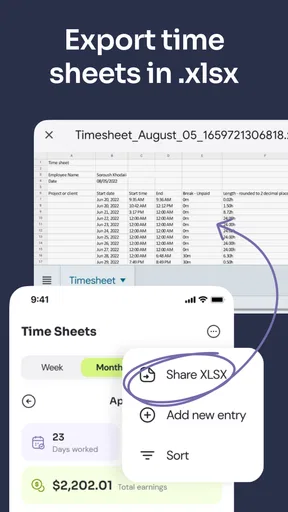
Another cool aspect is the ability to export data. If you need to share your time logs with a boss or client, you can easily export them in different formats. It’s professional and convenient, saving you the hassle of manually compiling reports.
In a realistic workday, I might start a block for a client task, pause when a delivery interrupts me, and resume when I return. At the end of the day, I can check the project record before sharing a log rather than relying on a vague memory of how long the work took. That workflow is most dependable when interruptions are captured promptly. If I forget to pause a timer and only notice much later, I would correct the record while I still remember the sequence instead of treating the unedited duration as precise.
Exporting is handy, but I would treat the resulting record as something to review before sending, especially when a client will use it to approve a bill. Make sure task labels are understandable to someone other than you, and check for a running timer or an entry that belongs to the wrong project. This is a simple habit, not a reason to distrust the app: accurate timekeeping still depends on the person using it. If your workplace requires a particular timesheet template or approval process, confirm that an exported file fits that workflow before relying on it as the final submission.
Why You Might Love It
If you’re someone who thrives on organization and efficiency, this app is right up your alley. It’s not just about tracking time, but about understanding it. You learn to manage your time better, identify bottlenecks, and even carve out more moments for relaxation.
Moreover, for those who work remotely or freelance, having a reliable tool to track billable hours is invaluable. Knowing exactly how long you’ve spent on a task means you can bill accurately and confidently.
I think it is especially suited to independent workers who need a personal record across several kinds of jobs, and to people who want a clear account of their own work hours without adopting a larger team platform. A freelancer can use project labels to keep separate client work distinct, then inspect the log before preparing an invoice. Someone with a regular shift can instead use it as a personal check on hours worked. In either case, the benefit comes from making time visible, not from expecting an app to decide how the day should be organized.
It is less compelling if you need a complete workforce-management system. A personal tracker is not automatically a replacement for an employer’s required attendance process, payroll tools, team scheduling, or a manager’s approval workflow. Likewise, if you only need to enter a weekly total once, a basic spreadsheet or paper timesheet may be quicker than maintaining task categories and timers. I would pick the simplest tool that meets the actual reporting requirement rather than logging detail for its own sake.
Compared with a general calendar, a time tracker is better suited to recording how long work actually took, while a calendar is designed to show what you planned to do and when. A spreadsheet gives more control over columns and formulas, but it asks you to build and maintain the structure yourself. This app sits between those options: it offers a focused way to track hours and organize them around tasks or projects, without requiring a custom sheet. That middle ground is its appeal, though people who need specialized invoicing or team controls may be better served by a dedicated business system.
The app is free to download, with in-app purchases ranging from $0.99 to $179.99 per item. I’d decide whether the basic time-recording workflow covers my needs before considering any optional purchase, and check what a particular item includes in the app before paying. It is rated for Everyone, and its current version is 3.4.1658; it requires Android 7.0 or later. Those details make it straightforward to assess basic access, but they do not change the key decision: whether you will reliably record your hours in the first place.
Wrapping It Up
In a world where time is of the essence, Time Clock: Easy Tracker is a handy companion. It’s like having a little coach in your pocket nudging you to stay on track. While it might not be the flashiest app out there, its utility shines through.
So, if you’re looking to take control of your time and boost your productivity, give it a try. You might just find yourself wondering how you ever managed without it.
My practical advice is to test it with one ordinary workweek and a small set of task labels. At the end, ask whether the record answered a real question: how much time a project took, whether your hours were captured correctly, or where a recurring interruption eats into focused work. If it did, keep the routine and refine your labels. If the logging itself became a distraction, simplify the categories or choose a less detailed method. That is a fair way to judge a time clock: not by how much data it can collect, but by whether the record helps you make a decision you could not make from memory alone.
Pros
- User-friendly interface enhances accessibility.
- Real-time syncing across multiple devices.
- Customizable alerts for task reminders.
- Detailed reporting for productivity analysis.
- Supports integration with popular calendar apps.
Cons
- Limited offline functionality can be restrictive.
- Free version lacks advanced features.
- Occasional sync delays with external apps.
- No option for manual data backup.
- Interface may feel cluttered for new users.
FAQs for Time Clock: Easy Tracker
What features does Time Clock: Easy Tracker offer?
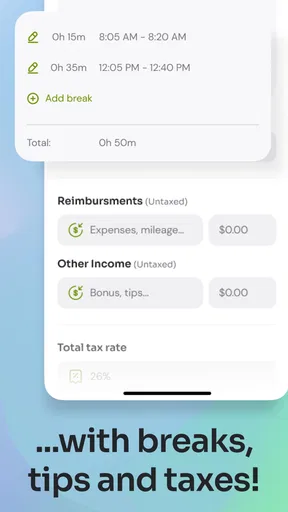
Time Clock: Easy Tracker provides a comprehensive suite of features designed for efficient time management. It includes time tracking, project management, and employee scheduling. Users can clock in and out easily, track work hours, manage breaks, and generate detailed reports. The app also supports integration with payroll systems, making it valuable for businesses of all sizes.
Is Time Clock: Easy Tracker suitable for both small and large businesses?
Yes, Time Clock: Easy Tracker is designed to cater to the needs of both small and large businesses. Its scalable features allow small teams to manage their schedules efficiently while providing robust tools for larger organizations to handle complex time management and payroll integration seamlessly.
Can Time Clock: Easy Tracker be used offline?
Time Clock: Easy Tracker offers offline functionality, allowing users to log time even without an internet connection. The app automatically syncs data once the device reconnects to the internet, ensuring that no information is lost and maintaining the accuracy of time records.
How secure is the data in Time Clock: Easy Tracker?
Time Clock: Easy Tracker prioritizes user data security with robust encryption protocols. The app ensures that all data, including employee records and work hours, is stored securely. Regular updates and compliance with privacy regulations further enhance the security, providing peace of mind to users and businesses.
Does Time Clock: Easy Tracker offer customer support?
Yes, Time Clock: Easy Tracker provides excellent customer support to assist users with any issues or questions. Support is available through multiple channels, including email, live chat, and a comprehensive help center. The responsive support team is dedicated to ensuring users have a smooth experience with the app.


